
Directory Monitor 2.17.0.0 Portable
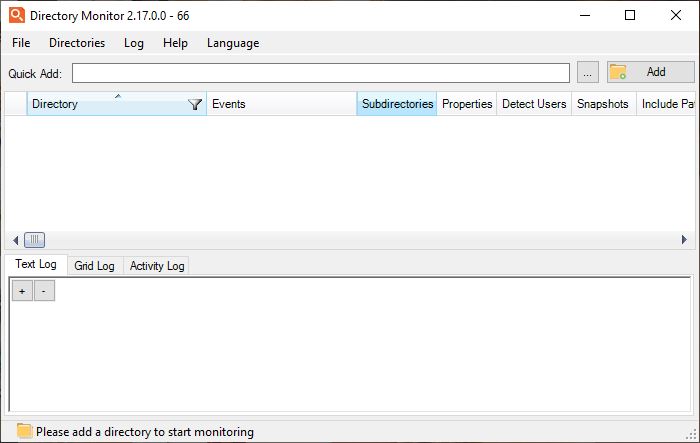
📂 Directory Monitor 2.17.0.0 Portable – Real-Time Folder & File Monitoring Utility
Directory Monitor 2.17.0.0 Portable is a Windows utility designed to monitor folders and track file-system activity in real time. It can detect changes such as new files, modifications, deletions, renames, and other directory activity, making it useful for troubleshooting, auditing, automation, and keeping track of important folders.
⭐ Key Features
- ✔ Monitor folders and subfolders for file-system changes
- ✔ Detect newly created files and folders
- ✔ Track modified, deleted, and renamed files
- ✔ Monitor directory activity in real time
- ✔ Display file-system events in an activity log
- ✔ Monitor multiple directories simultaneously
- ✔ Apply filters to focus on relevant file activity
- ✔ Run monitoring tasks in the background
- ✔ Provide notifications for detected directory changes
- ✔ Useful for troubleshooting, auditing, and system monitoring
📌 File Information
Software: Directory Monitor v2.17.0.0 Portable.rar
File Size: 8.6 MB
Format: RAR Archive
Category: File Monitoring / System Utility / Directory Management
Platform: Windows
📂 Monitor Folders in Real Time
Directory Monitor watches selected folders and reports file-system activity as it occurs. This provides a convenient way to see what is happening inside important directories without repeatedly checking them manually.
📄 Track File Changes
The application can detect different types of changes, including file creation, modification, deletion, and renaming. Recorded events help users identify when files have been changed and what type of activity occurred.
📁 Monitor Subdirectories
Monitoring can extend beyond the selected folder to include its subdirectories. This makes the utility useful for keeping an eye on larger folder structures where changes may occur at different levels.
📊 Activity Log
Detected file-system events are presented through an activity log, allowing users to review directory changes as they happen. The event information can help with troubleshooting and investigating unexpected file activity.
🔍 Filter Directory Activity
Filtering options can help narrow the displayed activity to the events that matter most. This is useful when monitored folders contain many files and generate a large number of routine changes.
🔁 Monitor Multiple Locations
Multiple directories can be monitored as part of the same workflow. This allows users to keep track of several important locations without having to run separate monitoring sessions for each folder.
🔔 Change Notifications
The software can provide notifications when relevant activity is detected in monitored locations. This helps users become aware of changes without constantly watching the application's event window.
💻 Background Monitoring
Directory monitoring can continue while users work with other applications. Background operation makes it practical for tracking folders that need continuous observation during normal computer use.
🔍 Troubleshooting & Auditing
Directory Monitor can help identify applications or processes that are causing unexpected changes to files and folders. Monitoring activity over time can provide useful information when investigating configuration changes, automated tasks, or unexpected file operations.
👤 For Home & Professional Users
The utility can be useful for developers, system administrators, IT professionals, and everyday users who need visibility into file-system activity. It provides a lightweight way to observe changes without requiring a full system-monitoring suite.
⚠️ Monitor Important Directories Carefully
Monitoring a busy directory can generate a large number of events, particularly when applications frequently create temporary files or update existing data. Users should configure monitoring and filtering options according to the activity they need to observe.