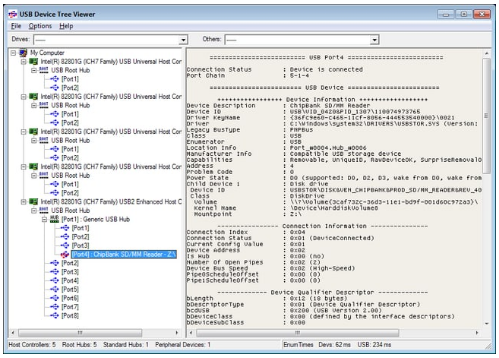
USB Device Tree Viewer 4.7.2

USB Device Tree Viewer is an advanced, high-precision hardware diagnostic utility designed to provide comprehensive, real-time technical readouts of the USB host controllers, hubs, and devices connected to your computer. Based on the foundational Microsoft "USBView" sample application from the Windows Driver Kit, this utility wraps complex hardware enumeration into an intuitive, hierarchical graphical user interface. While the interface is clean and easily accessible, the application is custom-tailored for tech-savvy users, developers, and hardware engineers who require deep-level interpretation of USB architecture and port allocations.
The utility systematically analyzes your system's underlying hardware configuration by querying the Windows registry and actively enumerating host controllers, root hubs, and individual port attachments. USB Device Tree Viewer maps out complex, multi-device topologies effortlessly, using smart jump-lists to maintain quick navigation even when handling massive arrays of connected equipment. From capturing raw descriptor hex dumps to managing automatic retries for previously failed USB device requests, it serves as an indispensable administrative terminal for managing bandwidth, diagnosing power states, and troubleshooting peripheral connectivity.
Features
Hierarchical Topology Mapping & Enumeration
- Advanced Tree-View Mapping: Structures your entire USB subsystem into a clear, visual hardware hierarchy, tracking connections from root host controllers down to multi-tiered external hubs and child devices.
- Registry & Controller Querying: Directly polls internal system frameworks to enumerate host controllers, map root hubs, and actively read the status of every physical and logical port.
- Complex Navigation Jump-Lists: Facilitates high-speed navigation via built-in jump menus, allowing users to move seamlessly through densely populated device maps without losing track of parent-child relationships.
Deep Controller & Peripheral Diagnostics
- Host Controller Auditing: Displays exhaustive operational data for host controllers, including manufacturer identities, active driver versions, bus types, system enumerators, and physical location strings.
- Comprehensive Port Analytics: Monitors critical real-time performance metrics, exposing active bus statistics, power states, available bandwidth allocations, COM mapping, and dedicated debug port assignments.
- Device Capability Tracking: Extracts granular device parameters such as device keynames, system descriptions, hardware addresses, connection statuses, and removal capabilities.
Advanced Troubleshooting & Configuration Controls
- Descriptor Hex Dump Reading: Allows technical users to access and analyze raw descriptor hex dumps via the configuration menu, providing vital low-level data for driver debugging.
- Automated Request Retries: Employs intelligent automatic retry loops for previously failed USB requests, helping to stabilize and identify faulty or intermittently disconnecting hardware.
- Status Bar Metrics: Provides an instant, high-level summary in the application status bar, displaying the exact total count of active hubs and connected peripherals across the system.