ExplorerPatcher 26100.8457.70.1

ExplorerPatcher

ExplorerPatcher is a powerful, open-source system customization utility engineered to restore classic user interface elements and enhance shell functionality within modern Windows operating systems. Operating as a lightweight system hook, it enables users to roll back the changes introduced in Windows 11 by bringing back the highly customizable Windows 10 taskbar and file explorer architectures. The software serves as an essential utility for power users and IT professionals who require an efficient, familiar, and uncompromised desktop environment for daily productivity.

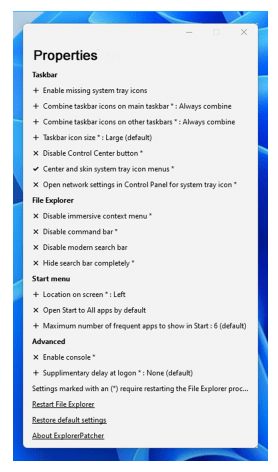
The utility features a comprehensive configuration interface that grants granular control over advanced system behaviors, notification tray icons, and shortcut menus. Beyond basic taskbar modifications, ExplorerPatcher incorporates deep system integrations to restore classic context menus, customize start menu layouts, and optimize window switching mechanics. Backed by a compact 10.0 MB operational footprint and a clean, native-looking settings console, it delivers a precise and robust desktop personalization workstation on any active computer.

Features

Taskbar Restoration & Layout Optimization

  • Classic Taskbar Rollback: Restores the functional Windows 10 taskbar layout natively onto Windows 11, re-enabling classic multi-monitor taskbar behaviors and individual window label displays.
  • Granular Position Mapping: Allows users to easily dock the taskbar onto the left, right, top, or bottom edges of the display, overriding modern OS layout restrictions.
  • Custom Quick Launch Toolbars: Re-introduces support for custom folder shortcuts, user toolbars, and legacy quick-launch links directly inside the active taskbar space.

File Explorer & Context Menu Tweaks

  • Legacy Context Menu Overrides: Disables the modern, multi-tier Windows 11 right-click menu, forcing the system to display the comprehensive, classic context menu instantly without extra key presses.
  • Ribbon & Command Bar Toggles: Switches the File Explorer top control bar interface between the classic Windows 10 Ribbon layout and the streamlined Windows 11 design dynamically.
  • Custom Window Sizing Rules: Restores precise Windows 10 window-snapping borders and padding configurations to maximize screen real estate during heavy multitasking.

Start Menu & Window Switching Enhancements

  • Adaptive Start Menu Matching: Configures the primary Start Menu to render using either native Windows 10 tiles or the centered Windows 11 interface based on user preference.
  • Classic Alt-Tab Switcher: Replaces the full-screen window switcher with the classic, compact Alt-Tab overlay module to accelerate switching between active software applications.
  • System Tray Icon Consolidation: Grants full control over system tray behaviors, letting users pin, unpin, or permanently hide modern network, volume, and clock flyouts cleanly.

Lightweight Architecture & System Safety

  • Native Resource Efficiency: Modifies interface behaviors cleanly by utilizing existing operating system binary codes, consuming virtually zero overhead or background processing power.
  • Dynamic System Updates: Maintains high system compatibility with continuous development builds mapped directly to major Windows Cumulative Update structures.
  • Instant Configuration Backups: Includes options to export active customization preferences into lightweight files, enabling rapid desktop profile deployment on secondary workstations.

Download ExplorerPatcher

ExplorerPatcher 26100.8457.70.1.rar - 10.0 MB

You might also like