
addLEDs v2.0.0.1
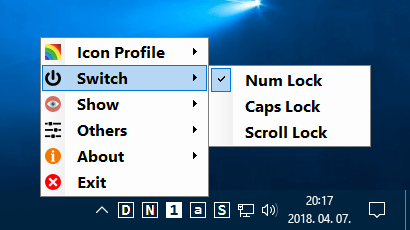
💡 addLEDs v2.0.0.1 – Keyboard LED Indicator Utility for Windows
addLEDs v2.0.0.1 is a lightweight Windows utility that provides visual indicators for keyboard lock states such as Caps Lock, Num Lock, and Scroll Lock. It can be useful on keyboards or computers where dedicated LED indicators are unavailable or difficult to see.
⭐ Key Features
- ✔ Display Caps Lock status
- ✔ Display Num Lock status
- ✔ Display Scroll Lock status
- ✔ Provide visual on-screen keyboard indicators
- ✔ Help monitor keyboard lock states
- ✔ Simple and lightweight Windows utility
- ✔ Useful for keyboards without visible LED indicators
📌 File Information
Software: addLEDs v2.0.0.1.rar
File Size: 210.1 KB
Format: RAR Archive
Category: Keyboard Utility / System Utility / Productivity
Platform: Windows
📖 About addLEDs v2.0.0.1
addLEDs v2.0.0.1 is designed to make keyboard lock-key status easier to monitor. Instead of relying only on physical keyboard LEDs, the utility provides visual feedback for Caps Lock, Num Lock, and Scroll Lock states.
It can be especially useful with compact keyboards, laptops, or other devices where traditional indicator lights are missing, hidden, or difficult to notice.
💡 Keyboard Status Indicators
addLEDs provides quick visual information about the current state of common keyboard lock keys. This helps users avoid accidentally typing with Caps Lock enabled or using an unexpected Num Lock setting.
⚡ Lightweight Utility
With its small file size and focused functionality, addLEDs can be a practical addition to a Windows desktop for users who want clearer keyboard status indicators.