
Angry IP Scanner 3.10.0
📡 Angry IP Scanner 3.10.0 – Fast Network Scanning & IP Address Discovery Tool
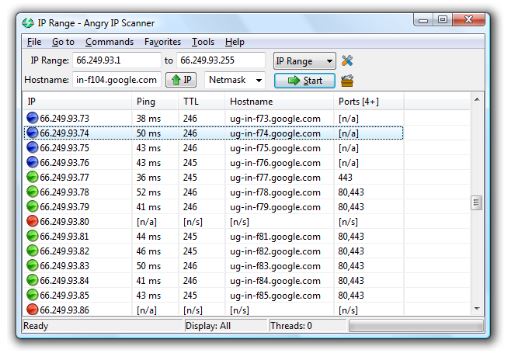
Angry IP Scanner 3.10.0 is a Windows network utility designed to scan IP address ranges and identify active devices on a network. It can help users and network administrators review connected hosts, examine basic network information, and organize scan results for routine network management and troubleshooting.
⭐ Key Features
- ✔ Scan specified IP address ranges
- ✔ Identify responsive devices on a network
- ✔ Display hostnames and available network information
- ✔ Scan local and remote network ranges with appropriate authorization
- ✔ Provide configurable scanning options
- ✔ Display scan results in an organized interface
- ✔ Useful for network administration and troubleshooting
📌 File Information
Software: Angry IP Scanner 3.10.0.rar
File Size: 23.8 MB
Format: RAR Archive
Category: Network Utility / IP Scanner / Network Administration
Platform: Windows
📡 Scan IP Addresses
Angry IP Scanner can scan a defined range of IP addresses and determine which hosts respond. This provides a quick overview of devices that are reachable within a network environment.
🔍 Discover Network Devices
The application can help administrators identify active computers, network equipment, and other responsive devices. The resulting information can be useful when maintaining an inventory of authorized network systems.
🌐 Review Network Information
Scan results can provide information such as IP addresses and hostnames where available. Reviewing this information can help users understand the structure of a network and troubleshoot connectivity issues.
⚙️ Configure Scanning Options
Users can configure the address ranges and available scanning options according to their network-management requirements. This allows scans to be focused on particular segments rather than an entire network.
📊 Analyze Scan Results
The results are presented in an organized format so users can review responsive hosts and associated information. This can make routine network administration and troubleshooting tasks more convenient.
💻 Network Administration
Angry IP Scanner can be useful for system administrators and IT professionals who need to check authorized networks for active hosts. It can assist with routine inventory, connectivity checks, and basic network diagnostics.
🛠️ Troubleshoot Connectivity
Scanning an authorized network can help determine whether particular IP addresses or hosts are responding. This can provide useful information when investigating basic connectivity or network-configuration problems.
🔒 Use Responsibly
Network scanning should only be performed on networks and systems that you own or have explicit permission to administer. Unauthorized scanning of external networks can violate organizational policies or applicable laws.