
Executor 2.3.4

Executor is a highly customizable, multi-purpose desktop launcher and command-line utility engineered to supercharge workflow efficiency and application management on Windows operating systems. Operating as an advanced, lightweight replacement for the native Windows "Run" dialog, it allows power users to launch programs, manage documents, search the web, and execute complex system commands via simple keyboard shortcuts. By index-mapping local applications and caching user-defined phrases, it transforms daily desktop navigation into a fast, keyboard-centric experience.
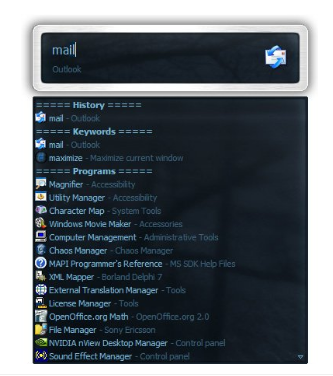
The utility features a minimalist interface that hides in the background until invoked by a global hotkey, maintaining a clean workspace. Executor stands out for its deep input keyword customization, enabling users to bind custom shorthand terms to multi-layered actions, specific directory paths, or parametric internet searches. Equipped with auto-completion matrices, historical command caching, and an integrated system tool manager, it delivers an agile control terminal designed to optimize productivity and eliminate repetitive mouse interactions.
Features
High-Speed Command & Application Launching
- Keyword-Driven Execution: Launches applications, system paths, URL links, and files instantly by typing personalized shorthand keywords.
- Intelligent Auto-Completion: Employs an adaptive text auto-completion matrix that suggests matching indexed programs and historical inputs in real time as you type.
- Parametric Query Routing: Supports advanced keyword arguments, allowing users to pass parameter variables directly into local binaries or web search engines.
Workflow Customization & Control Matrix
- Global Hotkey Invocation: Rises instantly over active application windows using a customizable global keyboard shortcut, dropping back into the tray immediately after execution.
- Integrated System Actions: Maps built-in administrative keywords to control core OS functions, allowing users to lock the workstation, restart, sleep, or shutdown via text commands.
- Clipboard & History Cache: Maintains a secure, accessible log of recently executed inputs and commands, letting you repeat multi-step tasks with a single keystroke.
Lightweight Architecture & Modular Interface
- Zero System Friction: Runs as a low-overhead background process, consuming minimal CPU and system memory to ensure no impact on active gaming or development workloads.
- Skinning and Layout Tuning: Supports fully customizable user interface themes, font adjustments, and transparency settings to blend seamlessly into any desktop layout.
- Index Exclusion Filters: Allows granular tuning of scanned system directories, preventing unwanted folders or confidential files from appearing in launcher results.
