
Hasleo Backup Suite Technician 5.9.2.4 Technician WinPE ISO
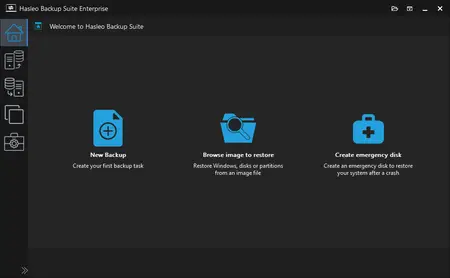
💾 Hasleo Backup Suite 5.9.2.4 Technician WinPE ISO – Bootable Backup and Recovery Environment
Hasleo Backup Suite 5.9.2.4 Technician WinPE ISO is a bootable recovery environment designed to help users back up, restore, and manage disks or partitions without starting the installed Windows operating system. It is useful for system recovery, disk management, and troubleshooting computers that cannot boot normally.
⭐ Key Features
- ✔ Boot into a Windows Preinstallation Environment (WinPE)
- ✔ Back up Windows systems, disks, and partitions
- ✔ Restore system images and backed-up data
- ✔ Clone disks and partitions using supported tools
- ✔ Recover systems when Windows cannot start normally
- ✔ Run backup and recovery operations from bootable media
📌 File Information
Software: Hasleo_Backup_Suite_5.9.2.4_Technician_WinPE.iso
File Size: 737.3 MB
Format: ISO Image
Category: Backup / System Recovery
Platform: Windows-compatible PCs
📖 About Hasleo Backup Suite Technician WinPE
Hasleo Backup Suite Technician WinPE provides a bootable environment for performing backup and recovery operations independently of the installed Windows system. It can be useful for troubleshooting startup problems, restoring previous backups, and managing storage devices during system maintenance.
📁 Bootable System Recovery
Use the ISO image to prepare compatible bootable media, such as a USB drive, and start the computer from that media. Once booted into WinPE, you can access supported backup, restoration, and disk-cloning tools without relying on the normal Windows desktop.