MediaInfo 26.05 + Portable

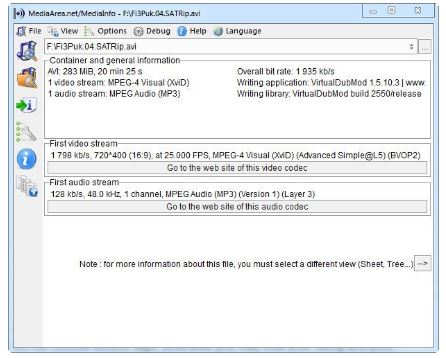
MediaInfo is an indispensable technical utility for video editors, encoders, and media enthusiasts who need detailed insights into the internal structure of audio and video files. It acts as a comprehensive diagnostic tool, pulling back the curtain on media containers to reveal exactly how a file was encoded. Whether you are troubleshooting a playback issue or verifying the specifications of a professional render, MediaInfo provides the most granular data available for nearly any media format in existence.
The software analyzes a vast array of parameters, from basic information like file size and duration to highly technical metadata such as bit depth, chroma subsampling, and specific codec profiles. It supports various viewing modes—ranging from a simple text summary to a sophisticated tree view or an HTML export—making it adaptable for both quick checks and deep technical audits. With its ability to identify missing codecs and provide links to official websites for the required software, MediaInfo is a foundational tool for maintaining a healthy and efficient digital media workflow.
- Comprehensive Format Support: Analyzes almost all modern video (MKV, MP4, AVI, MOV) and audio (MP3, FLAC, AAC, AC3) containers and codecs.
- Deep Metadata Analysis: Provides detailed technical data including resolution, aspect ratio, frame rate, bitrate mode (CBR/VBR), and writing library.
- Audio Stream Inspection: Identify the number of audio channels, sample rates, languages, and specific surround sound formats like DTS-HD or Dolby Atmos.
- Subtitle Detection: Detects and lists embedded subtitle tracks, including format details (SRT, SSA, ASS) and language tags.
- Multiple Viewing Options: Customize how data is displayed with choices like Basic, Sheet, Tree, Text, and HTML formats for easy reading or reporting.
- Export Capabilities: Save technical reports as text, CSV, or HTML files to share with colleagues or include in project documentation.
- Shell Integration: Quickly access media data directly from the Windows right-click context menu or via a powerful Command Line Interface (CLI) for automation.