
Open-Shell (Classic-Start) 4.4.201
💻 Open-Shell (Classic-Start) 4.4.201 – Customizable Windows Start Menu Utility
Open-Shell (Classic-Start) 4.4.201 is a Windows customization utility that brings alternative Start menu layouts and additional interface controls to the Windows desktop. It is designed for users who prefer a more traditional desktop navigation experience.
🏠 Classic Start Menu
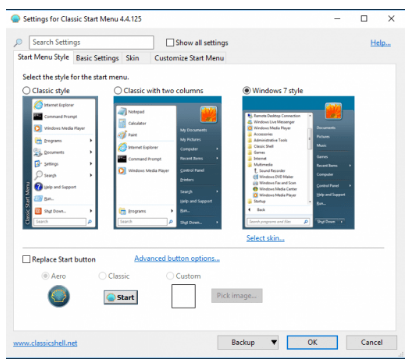
Open-Shell provides alternative Start menu styles that resemble traditional Windows layouts. Users can access installed applications, system locations, settings, and frequently used items through a customizable menu.
🎨 Menu Customization
The program allows users to adjust the appearance and behavior of the Start menu. Different menu styles and configuration options make it possible to create a desktop navigation layout that suits individual preferences.
🔍 Faster Program Access
Open-Shell includes convenient ways to locate installed programs and commonly used Windows functions. Its menu structure can make frequently accessed applications and system tools easier to reach.
⚙️ Start Menu Configuration
Users can configure various Start menu behaviors, including how menus open, which items are displayed, and how certain Windows interface elements respond to user actions.
📄 Windows Explorer Enhancements
Open-Shell also provides optional enhancements for Windows Explorer, giving users additional interface controls and customization options when working with folders and files.
🎨 Classic Interface Options
The utility is useful for users who prefer a familiar desktop interface instead of the default Start menu experience. Its configurable layouts provide several ways to organize navigation around traditional Windows conventions.
🛠️ Desktop Personalization
Open-Shell focuses on practical Windows interface customization rather than changing core operating-system functionality. Settings can be adjusted to create a more personalized Start menu and desktop workflow.
💻 Lightweight Windows Utility
With its relatively small package size, Open-Shell offers a focused collection of Start menu and Windows shell customization features for users who want greater control over their desktop navigation.
📌 File Information
Software: Open-Shell (Classic-Start) 4.4.201.rar
File Size: 8.4 MB
Format: RAR Archive
Category: Start Menu / Windows Customization / Desktop Utility
Platform: Windows