PicPick Professional 7.6.1 Portable

PicPick

📸 PicPick 7.6.1 Portable – Screen Capture & Image Editing Utility

PicPick 7.6.1 Portable is a Windows screen capture and image editing utility designed for taking screenshots, annotating captured content, and performing common graphics-related tasks. It combines screen capture tools, an image editor, color utilities, and measurement features in one application.

📷 Screen Capture

PicPick provides multiple screenshot modes for capturing different areas of the Windows desktop. Users can capture full screens, active windows, selected regions, and other supported screen areas.

✂️ Region Capture

The application allows users to select a specific portion of the screen for capture. This is useful when only a particular window, interface element, or section of a webpage needs to be saved.

🎨 Built-In Image Editor

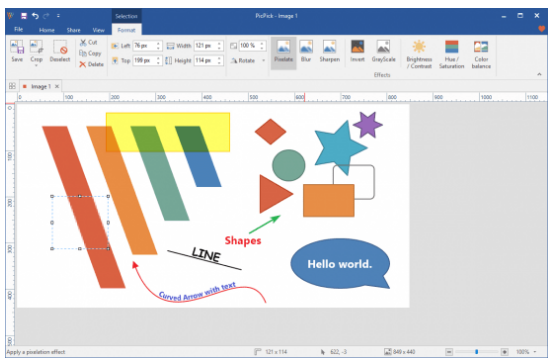
Captured screenshots can be opened in the integrated image editor for further processing. Users can add annotations, shapes, text, arrows, and other supported visual elements.

✏️ Image Annotation

PicPick provides annotation tools for highlighting information within screenshots. These features can be useful when preparing tutorials, documentation, presentations, or technical instructions.

🌈 Color Picker

The built-in color picker can identify colors displayed on the screen. This can be useful for designers, developers, and other users who need to inspect specific colors from applications or webpages.

📐 Pixel Ruler

PicPick includes screen measurement tools that can help users measure distances and dimensions directly on the desktop. This can be useful for interface design and visual layout work.

📐 Crosshair & Magnifier

Screen utility tools such as crosshair and magnification features can help users inspect small interface elements, align objects, and examine specific areas of the desktop more closely.

📄 Image Saving

Captured screenshots and edited images can be saved using supported image formats, making it convenient to store screenshots for documentation, sharing, or later editing.

🔄 Screenshot Workflow

PicPick combines screen capture, editing, annotation, color inspection, measurement, and image-saving tools into a unified workflow for everyday desktop and graphics tasks.

💻 Windows Desktop Utility

The application provides a practical collection of tools for users who frequently need to capture, analyze, annotate, or edit visual information displayed on a Windows computer.

🔧 Screen Capture & Graphics Utility

PicPick combines screenshot capture, image editing, annotations, color picking, screen measurement, magnification, and other desktop utilities in one Windows application.

📌 File Information

Software: PicPick 7.6.1 Portable.rar
File Size: 53.1 MB
Format: RAR Archive
Category: Screen Capture / Image Editing / Desktop Utility
Platform: Windows

📤 Download PicPick 7.6.1 Portable


🔥 Download from FilesPay - 53.1 MB


You might also like