
SideSlide 6.50
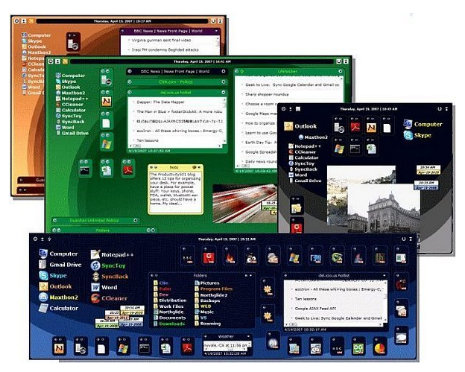
📄 SideSlide 6.50 – Desktop Organization & Productivity Tool
SideSlide 6.50 is a Windows desktop organization utility designed to provide quick access to files, folders, applications, notes, and other frequently used items. It offers a customizable workspace that can help users organize desktop content and improve access to commonly used resources.
⭐ Key Features
- ✔ Organize frequently used files and folders
- ✔ Create shortcuts for quick access to applications and resources
- ✔ Store notes, reminders, and text snippets
- ✔ Manage collections of desktop items
- ✔ Provide quick access to commonly used locations
- ✔ Customize the desktop workspace and item arrangement
- ✔ Help reduce desktop clutter and improve productivity
📌 File Information
Software: SideSlide 6.50.zip
File Size: 926.8 KB
Format: ZIP Archive
Category: Desktop Utility / Productivity / File Organization
Platform: Windows
📁 Organize Your Desktop
SideSlide provides a flexible workspace for organizing commonly used items. Files, folders, applications, and other resources can be arranged so they are easier to access without relying entirely on a crowded desktop.
⚡ Quick Access to Applications
Frequently used programs and system locations can be placed within the workspace for convenient access. This can help reduce the time spent searching through menus and folders for regularly used resources.
📄 Manage Files & Folders
Users can organize shortcuts and references to important files and folders in one location. This makes the utility useful for projects that require frequent access to multiple directories or documents.
📝 Notes & Text Storage
SideSlide can also be used for keeping notes, reminders, and small pieces of text. This provides a convenient space for information that users want to keep readily available while working on the computer.
📊 Create Organized Collections
Different items can be grouped and arranged according to personal workflows. Collections can help users keep related applications, documents, folders, and other resources together for faster navigation.
🎨 Customize Your Workspace
The desktop workspace can be adjusted to suit individual preferences. Users can organize available items and create a layout that fits their daily computing habits.
🧩 Reduce Desktop Clutter
By providing an alternative location for shortcuts and frequently accessed resources, SideSlide can help keep the standard Windows desktop cleaner and more organized.
💻 Improve Everyday Productivity
SideSlide can be useful for users who work with many files, applications, folders, and notes throughout the day. Its organization features provide a centralized way to access commonly needed information and resources.