
USB Safely Remove 7.5.1.1339 Portable
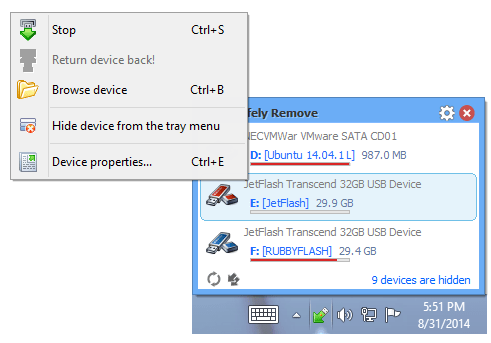
🔌 USB Safely Remove 7.5.1.1339 Portable – USB Device Management Utility
USB Safely Remove 7.5.1.1339 Portable is a Windows utility designed to make managing removable storage devices easier and safer. It provides an alternative to the standard Windows device removal tool, allowing users to stop and disconnect USB drives, external hard disks, and other removable devices through a convenient interface.
⭐ Key Features
- ✔ Safe Device Removal: Safely stop and disconnect USB drives and other supported removable storage devices.
- ✔ Device Management: View connected removable devices and manage them from a centralized interface.
- ✔ Force Stop Options: Identify applications or processes that may prevent a device from being safely removed.
- ✔ Keyboard Shortcuts: Use configurable hotkeys to access device removal functions quickly.
- ✔ Device Customization: Customize device names, icons, and available removal options.
- ✔ Command-Line Support: Use supported command-line options to automate certain device management tasks.
📌 File Information
Software: USB Safely Remove 7.5.1.1339 Portable.rar
File Size: 4.2 MB
Format: RAR Archive
Category: USB & Device Management Utilities
Platform: Windows