
VovSoft Speech to Subtitle Converter 2.5
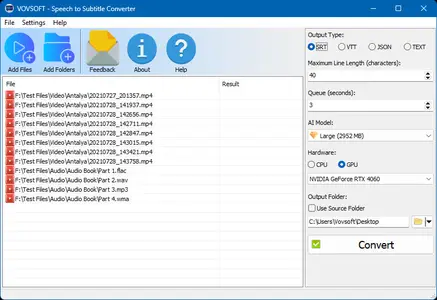
🎤 VovSoft Speech to Subtitle Converter 2.5 – Automatic Speech-to-Subtitle Conversion Tool
VovSoft Speech to Subtitle Converter 2.5 is a Windows utility designed to automatically transform spoken audio and video content into synchronized subtitles. It uses speech recognition technology to convert voice into text while matching the generated text with the appropriate timestamps.
🎧 Convert Speech into Subtitles
The application can recognize spoken content from supported media and turn it into subtitle text, helping users reduce the time normally required for manual transcription.
🌐 Support Multiple Languages
VovSoft Speech to Subtitle Converter supports more than 50 languages, making it suitable for creating subtitles from recordings containing speech in different language environments.
⏱️ Automatic Timestamp Synchronization
Generated subtitle text can be synchronized with the corresponding portions of the recording, allowing the captions to appear at suitable points during audio or video playback.
📄 Support SRT and VTT
The software supports two widely used subtitle formats: SRT and VTT. SRT is commonly used for movies and videos, while VTT is frequently used with online video and transcription platforms.
🎬 Convert Videos to Subtitles
In addition to audio, the application can process supported video files and automatically extract their spoken content for subtitle generation.
🎵 Process Audio Files
Users can work with common audio formats including MP3, FLAC, WAV, and OGG, making the utility suitable for recordings, interviews, lectures, speeches, and other voice-based material.
📺 Support Multiple Video Formats
The converter supports a range of video formats such as MP4, WEBM, MKV, AVI, MPEG, MOV, WMV, FLV, and TS, providing flexibility when working with different types of media files.
🤖 AI-Powered Transcription
The application uses modern speech recognition technology to automate the transcription process, helping users create subtitle content without manually typing every spoken word.
📝 Create Closed Captions
The software can be useful for preparing closed captions for recorded lectures, presentations, speeches, tutorials, interviews, and other videos where accessible text-based dialogue is required.
⏰ Save Transcription Time
By automatically converting spoken material into synchronized subtitle text, the application can significantly simplify workflows that would otherwise require listening to recordings and manually entering dialogue.
⚙️ Convenient Subtitle Workflow
The focused interface and automatic processing features make it suitable for users who regularly need to convert spoken recordings into ready-to-use subtitle files.
📌 File Information
Software: VovSoft Speech to Subtitle Converter 2.5.zip
File Size: 147.7 MB
Format: ZIP Archive
Category: Speech Recognition / Subtitle Creation / Audio & Video Utilities
Platform: Windows