
Dipiscan 2.8.0
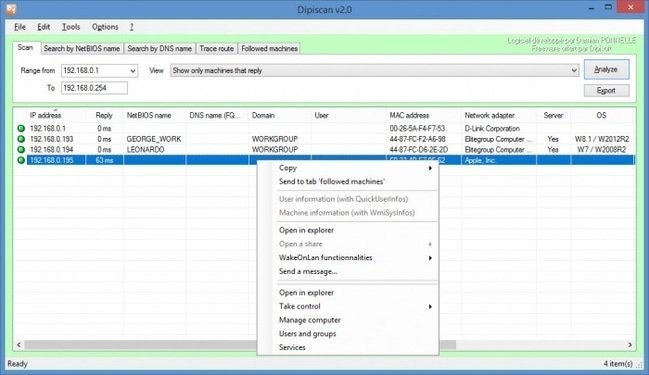
🔌 Dipiscan 2.8.0 – Network Scanner & IP Device Discovery Tool
Dipiscan 2.8.0 is presented as a Windows network-scanning utility designed to discover devices connected to a local network and display available network information. It can be useful for network administrators and users who need to identify computers, devices, and network resources within a specified IP range.
⭐ Key Features
- ✔ Scan specified IP address ranges for connected devices
- ✔ Discover computers and other network-connected systems
- ✔ Display available network and device information
- ✔ Help identify active hosts on a local network
- ✔ Assist with basic network inventory and troubleshooting
📌 File Information
Software: Dipiscan 2.8.0.rar
File Size: 2.0 MB
Format: RAR Archive
Category: Network Tools / IP Scanner / Network Administration
Platform: Windows
🔌 About Dipiscan
Dipiscan is designed to scan a network and provide information about devices that respond within a selected IP address range. It can help users gain an overview of systems currently accessible on a local network.
📡 Network Scanning
The application can scan specified IP ranges to identify active network hosts. This can be useful for checking which addresses are currently in use and identifying devices connected to a local network.
💻 Device Discovery
Dipiscan can help display information associated with discovered devices, depending on what information is available from the network and the target system. This can assist with identifying computers and other network resources.
📊 Network Inventory
Network administrators can use scanning results as part of a basic inventory workflow. Identifying active hosts can make it easier to understand the structure of a local network and keep track of connected systems.
🔧 Troubleshooting
Network scanning can help investigate connectivity and configuration issues by showing which addresses respond to a scan. Comparing expected devices with discovered hosts may help identify configuration problems or unavailable systems.
⚙ Local Network Management
Dipiscan can be useful for routine network administration tasks where administrators need to inspect a local network and identify active devices. Scan results depend on network configuration, firewall rules, device settings, and available permissions.
⚠ Network Scanning Considerations
Only scan networks and devices that you own or are authorized to administer. Network scanning may generate traffic and some devices or security systems may interpret scanning activity as suspicious or unauthorized behavior.