
Zero Install 2.29.3 Portable
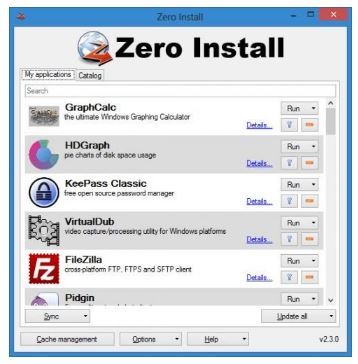
📄 Zero Install 2.29.3 Portable – Decentralized Software Distribution
Zero Install 2.29.3 Portable is a software distribution and application management utility that provides an alternative approach to installing and managing Windows applications. It allows supported software to be downloaded, configured, and launched through the Zero Install environment while helping keep different application versions and dependencies organized.
⭐ Key Features
- ✔ Run supported applications without traditional system-wide installation
- ✔ Manage multiple application versions
- ✔ Handle application dependencies
- ✔ Download applications from configured software feeds
- ✔ Keep different application versions separated
- ✔ Simplify software distribution and application management
- ✔ Launch supported applications directly through Zero Install
📌 File Information
Software: Zero Install 2.29.3 Portable.zip
File Size: 1.6 MB
Format: ZIP Archive
Category: Software Management / Application Launcher / Utilities
Platform: Windows
📊 About Zero Install 2.29.3
Zero Install uses a decentralized approach to software distribution and application management. Instead of depending entirely on conventional installers, supported applications can be obtained and managed through Zero Install, providing users with an alternative way to organize and run their software.
💻 Application Management
Zero Install provides an environment for managing supported applications and their associated components. Users can access available software through configured feeds and manage applications without following the same installation workflow used by traditional Windows programs.
📦 Software Distribution
The software uses a decentralized distribution model in which applications can be obtained from available feeds. This approach allows supported software to be managed independently rather than requiring every application to be installed directly into the Windows system.
🔄 Multiple Versions
Zero Install is designed to work with different versions of applications. Keeping application versions separately managed can be useful when a particular program requires a specific release or when users need to switch between available versions.
⚙️ Dependency Management
Application dependencies are handled as part of the Zero Install environment. This helps supported applications obtain the components they require while reducing the need to manually install shared dependencies throughout the Windows system.
🚀 Application Launching
Once supported software has been made available through Zero Install, it can be launched from the application management environment. This provides a convenient way to access managed applications without repeatedly going through traditional setup procedures.
📊 Software Updates
The Zero Install model can simplify the process of working with updated application versions. Users can manage available versions through the software distribution system while retaining access to versions that may still be required for compatibility or specific tasks.