
Darktable 5.6.0 Portable
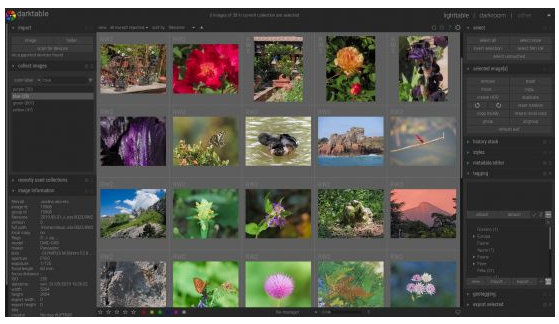
📷 darktable 5.6.0 Portable – RAW Photo Processing & Image Editing Software
darktable 5.6.0 Portable is an open-source photography workflow application designed for developing RAW images, editing photographs, and managing large collections of digital photos. It provides a non-destructive editing environment with tools for color correction, exposure adjustment, image organization, and professional photo processing.
⭐ Key Features
- ✔ Process and develop RAW photographs
- ✔ Apply non-destructive image adjustments
- ✔ Adjust exposure, contrast, brightness, and color
- ✔ Manage and organize large photo collections
- ✔ Use advanced color and tone correction tools
- ✔ Apply filters, effects, and image-processing modules
- ✔ Compare, rate, tag, and categorize photographs
- ✔ Export edited images in supported formats
📌 File Information
Software: darktable 5.6.0 Portable.rar
File Size: 118.7 MB
Format: RAR Archive
Category: RAW Processor / Photo Editor / Photography Workflow
Platform: Windows
📊 About darktable 5.6.0
darktable 5.6.0 is a digital photography workflow application that combines RAW development with photo management and editing tools. It is designed to provide photographers with a structured environment for importing, organizing, adjusting, and exporting images.
📷 RAW Image Processing
darktable provides tools for developing RAW photographs and adjusting the information captured by digital cameras. Users can fine-tune exposure, color, contrast, highlights, shadows, and other image properties to create a finished photograph.
✨ Non-Destructive Editing
The software uses a non-destructive workflow, allowing users to make adjustments without permanently altering the original image data. This makes it possible to experiment with different editing settings while retaining the source photograph for future processing.
🎨 Color & Tone Correction
darktable includes a wide selection of image-processing modules for controlling colors, tones, contrast, and overall image appearance. These tools can be used to correct photographs or create specific visual styles.
📁 Photo Management
The application includes features for organizing and managing photo collections. Users can browse their images, add ratings and tags, categorize photographs, and locate specific files within larger libraries.
🖼 Image Processing Modules
darktable provides a modular editing workflow in which different processing tools can be applied to photographs. Users can combine adjustments for exposure, color, sharpening, noise reduction, effects, and other aspects of image development.
🔍 Photo Selection & Organization
Photographers can review and compare images while working through a collection. Rating and tagging features help organize photographs and make it easier to identify preferred images for further editing or export.
💾 Image Export
After completing the editing process, photographs can be exported into supported image formats for sharing, publishing, printing, or further use in other applications. Export settings can be adjusted according to the intended destination of the final image.
💻 Photography Workflow
By combining RAW development, non-destructive editing, image organization, and export capabilities, darktable provides a complete workflow for managing digital photography. It can be useful for photographers who need detailed control over their images from initial import through final output.