
Desktop Icon Backup Manager 1.7.5 Portable
📄 Desktop Icon Backup Manager 1.7.5 Portable Download – Desktop Icon Backup & Restoration Tool
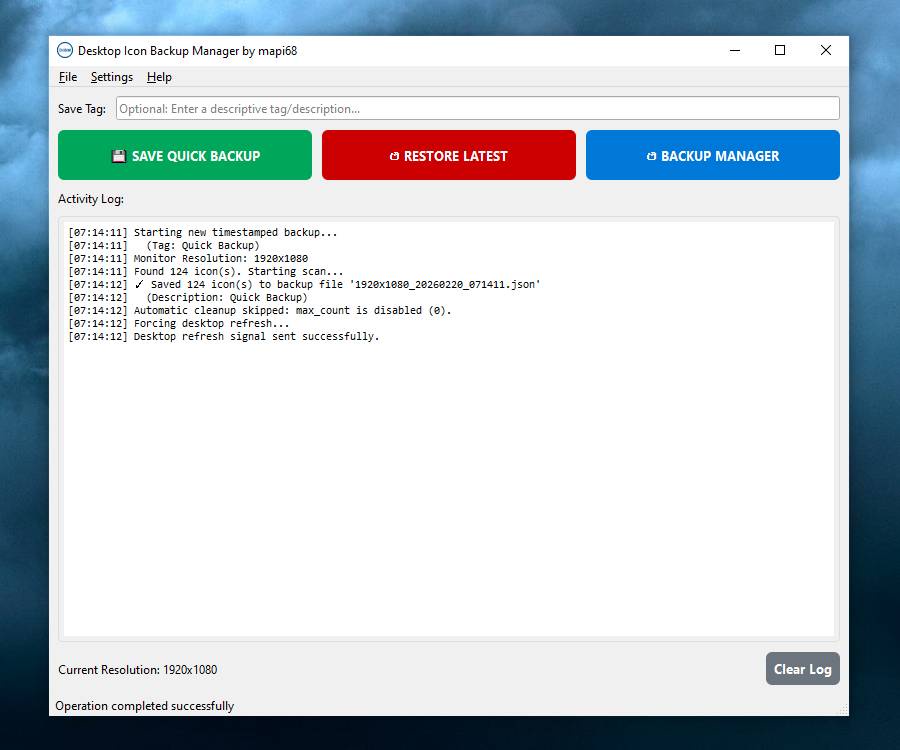
Desktop Icon Backup Manager 1.7.5 is a Windows utility designed to save, restore, and manage desktop icon layouts. It can help users preserve the arrangement of shortcuts and icons on the Windows desktop and quickly restore their preferred layout when needed.
⭐ Key Features
- ✔ Save the current desktop icon arrangement
- ✔ Restore previously saved icon layouts
- ✔ Create multiple desktop layout backups
- ✔ Preserve the position of desktop shortcuts
- ✔ Quickly switch between saved layouts
- ✔ Help recover an organized desktop after changes
- ✔ Maintain different icon arrangements for different tasks
- ✔ Simplify desktop layout management
- ✔ Reduce the need to manually rearrange icons
- ✔ Provide an easy way to manage desktop configurations
📌 File Information
Software: Desktop Icon Backup Manager 1.7.5 Portable
File Size: 33.73 MB
Format: RAR Archive
Category: Desktop Utilities / Backup Tools / System Utilities
Platform: Windows
📖 About Desktop Icon Backup Manager 1.7.5
Desktop Icon Backup Manager 1.7.5 is a Windows utility focused on preserving desktop icon positions and layouts. It provides a convenient way to save the current arrangement of desktop shortcuts and restore it whenever the layout changes.
Desktop icons can sometimes become rearranged after changes in display settings, resolution, monitor configurations, or other system adjustments. This type of utility can help users keep a preferred arrangement available for quick restoration.
The software can also be useful for users who maintain different desktop layouts for work, entertainment, presentations, or multiple monitor configurations and want to switch between saved arrangements more easily.
📊 Why Use Desktop Icon Backup Manager?
Manually restoring a carefully organized desktop can be time-consuming when icons have been moved or rearranged. Desktop Icon Backup Manager provides a simple way to preserve and restore desktop layouts.
Its focus on icon arrangement backups makes it useful for users who frequently change display configurations or want an easy way to keep their preferred Windows desktop organization safe.