
FreeCommander XE 2026 Build 953 (x64) Portable
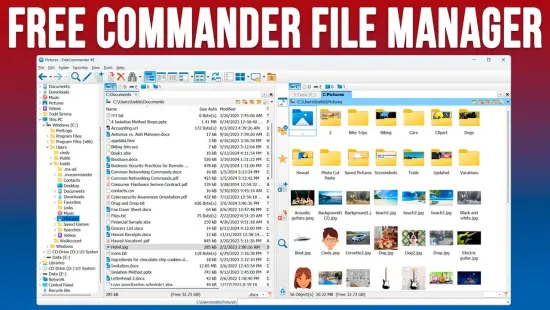
📁 FreeCommander XE v2026 Build 953 Portable – Advanced Dual-Pane File Manager for Windows
FreeCommander XE v2026 Build 953 Portable is presented as a Windows file-management utility designed to make everyday work with files and folders faster and more organized. Its dual-pane approach allows users to view two locations at once, making it convenient to browse directories, copy data, move files, and manage large collections of content.
⭐ Key Features
- ✔ Dual-pane interface for convenient file management
- ✔ Browse two folders or storage locations simultaneously
- ✔ Copy, move, rename, and delete files and folders
- ✔ Search for files and folders across supported locations
- ✔ Work with archives and compressed file content
- ✔ Manage files across local and connected storage
- ✔ Customize the file-management workspace
📌 File Information
Software: FreeCommander XE v2026 Build 953 Portable.rar
File Size: 30.6 MB
Format: RAR Archive
Category: File Manager / File Explorer / System Utilities
Platform: Windows
📁 Two-Pane File Management
FreeCommander XE uses a dual-pane layout that lets users work with two folders at the same time. This arrangement is particularly useful when transferring files between directories because the source and destination locations can remain visible together.
📦 Copy & Move Files Easily
Common file operations such as copying, moving, renaming, and deleting can be performed directly from the file-management interface. The two-panel workspace can make repetitive file transfers easier to organize and monitor.
🔍 Powerful File Search
The application provides search capabilities for locating files and folders on supported storage locations. This can be useful when working with large directories where manually browsing through multiple levels of folders would take more time.
🗃️ Work with Archives
FreeCommander XE includes functionality for handling supported compressed archives, allowing users to access archive contents as part of their normal file-management workflow without relying entirely on the standard Windows Explorer interface.
💾 Manage Different Storage Locations
The file manager can be used to organize content across available drives, folders, removable storage, and other accessible locations. This makes it suitable for everyday file organization as well as more involved data-management tasks.
⚙️ Customizable Workspace
Users can configure aspects of the file-management environment according to their preferred workflow. A customizable interface can be helpful for users who frequently perform repetitive file operations and want quick access to commonly used tools.
📊 Useful for Everyday File Organization
From sorting personal documents and media collections to moving project files between folders, FreeCommander XE provides a more feature-rich alternative to a basic file browser. Its multi-pane approach can be especially convenient for users who regularly work with several directories or storage devices.