
Visual Subst 6.1 Multilingual Portable
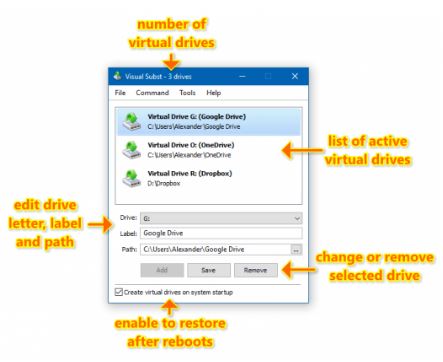
📁 Visual Subst v6.1 Portable – Virtual Drive & Folder Management Utility
Visual Subst v6.1 Portable is a Windows utility designed to simplify the management of virtual drive letters for folders. It provides a graphical interface for creating and managing drive mappings, making frequently used directories easier to access through Windows Explorer.
💾 Virtual Drive Creation
Visual Subst allows users to assign a drive letter to a selected folder. The mapped folder can then be accessed through a familiar drive-style path instead of navigating through the complete directory structure.
📁 Folder Mapping
The application provides a straightforward way to associate folders with available drive letters. This can be useful for frequently accessed directories, project folders, application data, and other locations.
💻 Windows Explorer Integration
Mapped folders can appear as drive locations within Windows, providing quicker access to directories that would otherwise require several navigation steps.
⚙️ Drive Letter Management
Users can review and manage existing virtual drive assignments through the application's interface. This makes it easier to keep track of which folders are associated with particular drive letters.
🔄 Mapping Management
Visual Subst provides controls for adding, modifying, and removing folder-to-drive mappings. Users can adjust their virtual drive setup as their storage or project organization changes.
🔑 Simplified File Paths
Assigning a drive letter to a deeply nested folder can make its path shorter and easier to work with. This can be particularly convenient when frequently accessing the same directory from different applications.
📊 Persistent Folder Access
The utility can help maintain convenient folder mappings so commonly used directories remain accessible through their assigned drive letters according to the configured Windows environment.
💻 Lightweight Windows Utility
Visual Subst v6.1 focuses on one specific Windows task: managing virtual drive mappings for folders. Its graphical approach provides an alternative to configuring folder substitutions manually through command-line tools.
📌 File Information
Software: Visual Subst v6.1 Portable.rar
File Size: 9.1 MB
Format: RAR Archive
Category: Virtual Drive / Folder Management / Windows Utility
Platform: Windows