
WinDirStat 2.6.0

WinDirStat is a powerful disk usage statistics viewer and storage cleanup utility engineered to give Windows users an immediate graphical representation of their hard drive capacity. It serves as an analytics station that allows you to pinpoint local space hogs at a glance, mapping out dense directories that are otherwise hidden within deep system paths. Operating inside a lightweight architecture, the program indexes storage volumes at high speeds, transforming abstract file structures into an interactive, color-coded visual matrix.

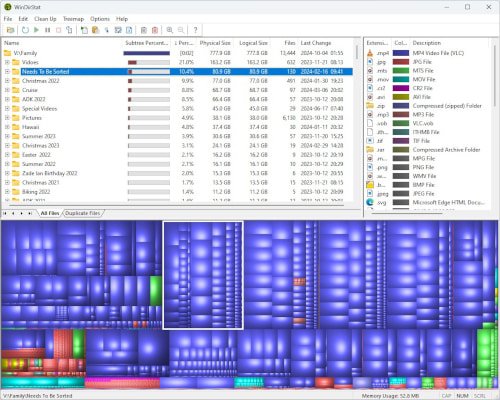
The software features a unique, synchronized three-pane layout that links a traditional Directory Tree list directly to a dynamic visual Treemap and an Extension classification ledger. By assigning larger physical geometric blocks to heavier files and color-coding them by file type, WinDirStat lets you see literally at a glance where storage space is being exhausted. Equipped with built-in cleanup routines and customizable, command-line automation actions, it provides an efficient environment for purging system clutter and reclaiming local disk sectors.

Features

Synchronized Multi-Pane Drive Analysis

  • Interactive Treemap Visualization: Displays files and directories as proportional geometric blocks, assigning larger screen areas to larger files so you can easily spot drive space hogs.
  • Hierarchical Directory Tree: Works simultaneously alongside the treemap view, presenting folders in a traditional list format to show exact file sizes and percentage allocations.
  • Extension Classification Ledger: Organizes and colors the storage matrix based on file extensions, allowing you to instantly determine whether videos, archives, or system logs are taking up the most space.

Targeted Storage Cleanup & Detection

  • Duplicate File Detection: Scans drive structures to identify redundant file allocations, helping you clean up identical backups and cloned datasets cluttering your storage layers.
  • Built-In Maintenance Actions: Allows users to manage files directly from the interface using quick right-click actions, including opening directories, viewing properties, and deleting items.
  • Custom Command-Line Actions: Enables power users to define and run personalized cleanup scripts via the command line, automating repetitive maintenance tasks.

Resource Efficiency & Navigation

  • Rapid Volume Indexing: Leverages optimized file-system reading routines to quickly scan massive storage arrays and compile drive statistics without bottlenecking CPU resources.
  • Proportional Disk Mapping: Provides an immediate, accurate impression of drive data proportions, showing how much space is free versus occupied by specific folders.
  • Lightweight System Footprint: Runs efficiently with low memory overhead, ensuring a stable desktop environment while analyzing heavy internal or external storage drives.

Download WinDirStat

Jioupload - 2.87 MB

You might also like