
KShutdown 6.2 Portable
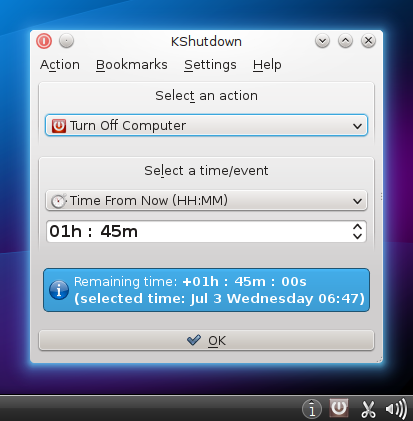
⏰ KShutdown 6.2 Portable – Automatic Shutdown & Power Management Tool
KShutdown 6.2 Portable is a Windows utility designed to automate computer power-management actions. It can schedule tasks such as shutting down, restarting, logging off, locking the computer, or putting the system into a selected power state after a specified amount of time or at a particular time.
⭐ Key Features
- ✔ Schedule automatic computer shutdowns
- ✔ Restart or log off the Windows system automatically
- ✔ Set actions based on a specific time or countdown
- ✔ Lock the computer when a scheduled action is triggered
- ✔ Automate power-management tasks
- ✔ Configure countdowns for planned system actions
- ✔ Useful for unattended computer operations
📌 File Information
Software: KShutdown 6.2 Portable.7z
File Size: 9.4 MB
Format: 7Z Archive
Category: System Utility / Power Management / Automation
Platform: Windows
⏰ Schedule Computer Actions
KShutdown provides a convenient way to automate common computer power actions. Users can configure an operation in advance instead of waiting beside the computer to shut it down or restart manually.
🕒 Set Timed Shutdowns
The application can schedule a shutdown using a countdown or a specified time. This can be useful when a lengthy task is expected to finish later and the computer does not need to remain powered on afterward.
🔄 Restart & Log Off
In addition to shutdown operations, KShutdown can be configured for other supported system actions such as restarting or logging off. These options provide greater flexibility for managing unattended Windows sessions.
🔒 Lock Your Computer
A scheduled lock action can help secure a workstation when it is left unattended. This provides a simple way to automate a basic security-related action after a selected period.
⚙️ Automate Power Management
KShutdown is useful for users who regularly need scheduled power-management operations. Automated actions can help reduce the need for manual intervention during downloads, long-running tasks, or other unattended activities.
💻 Useful for Unattended Tasks
The software can be helpful when a computer needs to remain active for a specific period before performing a power action. Users can configure the desired operation in advance and allow the system to handle it automatically.
⏳ Simple Countdown Control
Countdown-based scheduling makes it easy to specify how long the computer should continue running before an action takes place. This can be convenient for everyday tasks where an exact clock time is not necessary.